Scribe
A downloadable tool for Windows
What is Scribe
Scribe is a fast, offline subtitle generator and transcription tool powered by the Whisper large-v3 AI model.
Drop a file. Get subtitles. That's it.
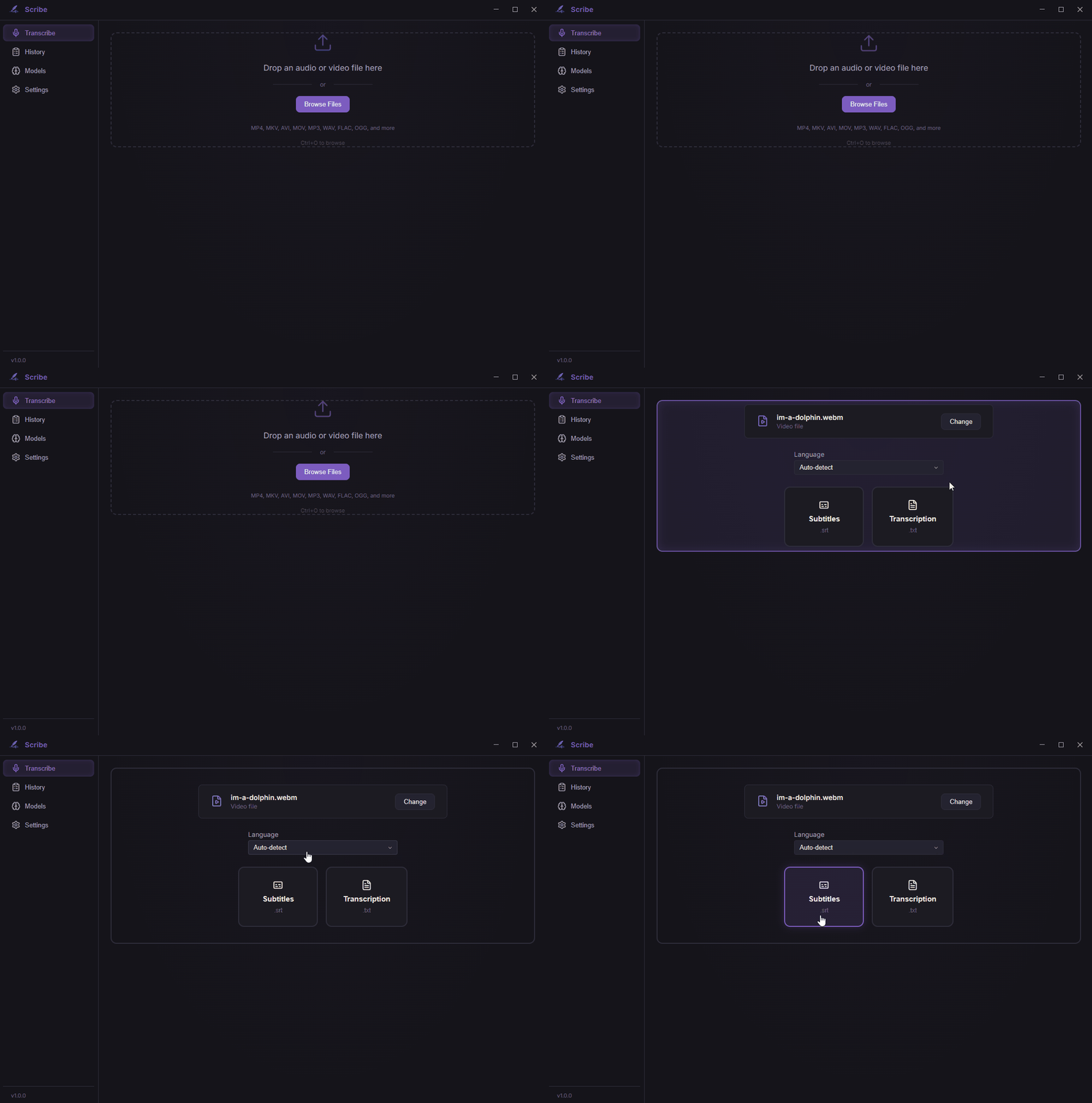
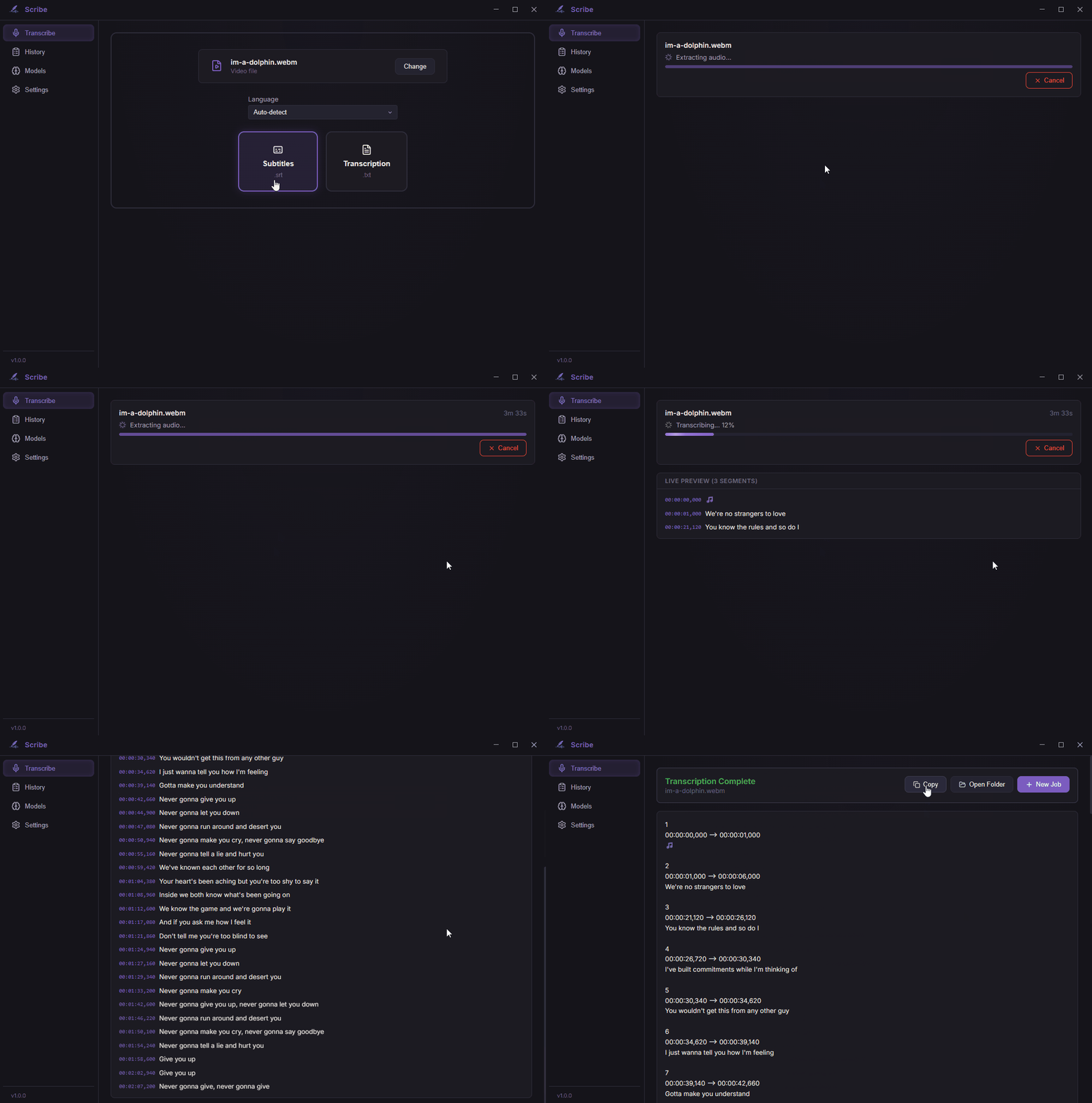
Scribe takes any audio or video file and generates timed subtitles (.srt) or plain text transcripts (.txt). Everything runs locally on your machine.
No uploads. No accounts. No subscriptions.
On first launch, Scribe will prompt you to download a Whisper model (~3 GB for large-v3). After that, everything runs fully offline. No setup, no API keys.
Cloud transcription tools charge per minute. Scribe runs locally and costs once.
Features
- Drag & drop any audio/video file (mp3, wav, mp4, mkv, webm, flac, etc.)
- Batch processing — drop entire folders, process everything at once
- Audio cleanup — denoise background noise and isolate vocals from music before transcription
- Timed .srt subtitles or .txt transcripts
- Folder tree view with live status indicators (pending, processing, done, failed)
- 99 languages with auto-detection
- GPU accelerated via Vulkan (works on CPU too, just slower)
- One-time model download on first launch (~3 GB), then fully offline
Who's this for?
Content creators — Generate subtitles for YouTube, TikTok, and video platforms without paying per minute.
Podcasters — Turn episodes into transcripts instantly. Vocal isolation strips background music for cleaner results.
Students — Transcribe lectures or recordings for easier studying. Denoise removes classroom noise automatically.
Translators — Create a first-pass transcript to clean up.
Privacy-conscious users — Your audio never gets uploaded to a server.
Why Scribe?
Most transcription tools are cloud services. That means uploading files, waiting for processing, paying per minute, and trusting someone else with your audio.
Scribe works differently:
- No uploads — everything stays on your machine
- No subscriptions — pay once, use forever
- No waiting — processing starts immediately, on your hardware
- No internet needed — works fully offline
Language Support
Whisper supports 99 languages. How well it works depends on the language:
Works great: English, Chinese, German, Spanish, French, Japanese, Portuguese, Russian, Korean, Italian, Dutch, Polish, Swedish, Turkish, Arabic — basically anything with lots of training data.
Works well: Most European, East Asian, and South Asian languages.
Hit or miss: Rarer languages may have reduced accuracy. We're looking into ways to improve this.
Audio quality matters too. Clean recordings (podcasts, interviews, lectures) give the best results. Heavy background music or sound effects will reduce accuracy — try enabling audio cleanup to help with this.
What's Next
- Translation — transcribe in one language, translate to another. All local, no cloud.
- Video tools — trim clips, burn subtitles into video
- Extension packs — specialized models for specific content
- More based on what you all ask for
Buy early, get all future updates at no extra cost.
A few things to know
- This is AI transcription. It's good, but it's not perfect — no tool is. Expect occasional errors with accents, mumbling, overlapping speakers, or noisy audio.
- Some languages work much better than others.
- Vocal isolation uses GPU acceleration. Requires ~4 GB VRAM for best performance. Falls back to CPU if unavailable (slower).
System Requirements
Minimum:
- OS: Windows 10 (64-bit)
- RAM: 8 GB
- Storage: 4 GB (includes the AI model)
- CPU: Any modern x64 processor (it'll work, just slow)
- GPU VRAM: 4 GB (if using GPU mode)
Recommended:
- RAM: 16 GB
- GPU: Any Vulkan-compatible GPU with 6+ GB VRAM (NVIDIA, AMD, Intel Arc)
- A GPU makes a huge difference in speed
Credits
Powered by OpenAI Whisper (MIT License) Audio cleanup: nnnoiseless (BSD-3-Clause), HTDemucs via demucs-rs (MIT/Apache 2.0)
Purchase
In order to download this tool you must purchase it at or above the minimum price of $7.99 USD. You will get access to the following files:
Development log
- Scribe v1.2 - Audio CleanupMar 21, 2026
- Scribe v1.1 - Batch ProcessingMar 16, 2026
- Why I Built ScribeMar 14, 2026
Comments
Log in with itch.io to leave a comment.
Hi, can you get this program to process many videos at once? I have a folder of video files (each in their own folder) and it would be ideal to generate subtitles for all of them with one drag-and-drop (or to select the parent folder and it would work recursively looking for video files). If it could auto save the subtitles in the same folder as the video that would be perfect.
Is this possible, or would you mind adding it? Thanks!
Hey, thanks for the interest!
Batch processing is a cool idea, making the process actually parallel - as in real time transcribing multiple videos at once - would add serious load to the processing unit, but having all videos in a folder being processed one after the other is certainly possible. Drag-and-drop a folder, process all videos, save SRT files next to the originals. I’ll add it to the roadmap! Stay tuned!
That would be fantastic, thank you! Buying the program now in preparation for the bulk processing 👍
Thank you for your support. Don’t worry, since it is community requested it is on top of the feature list. I’ll upload it as soon as the feature is available! Sit tight!
V1.1 is live, batch processing added as you requested. I hope Scribe helps with your projects!
Thank you again for your support!
Thank you so much!
You are very much welcome, reach out if you need anything!